Evalezy app · Launching soon
Check a whole class’s copies from your phone.
Unit Test 3 · Maths
Class 8-BAarav S.
Roll 12
Diya M.
Roll 13
Kabir R.
Roll 14
No name found
3 pages
How it works
Paper in, copies in, checked copies out.
1Add the paper
Add the question paper once.
Upload the question paper PDF and it is read into questions with marks. Evalezy drafts a marking scheme per question that you can edit. Do it once per test; every copy is marked to the same scheme.
Today the paper is added in the Evalezy dashboard, with the same login.
Step 1 of 3
SST Half-Yearly Mock · IX-B
SST_half_yearly_IX.pdf
Read · 38 questions · 80 marks
Section AQ1–2020 marksSection BQ21–2612 marksSection CQ27–3218 marksSection DQ33–3620 marksSection EQ37–3810 marksAdd copiesMarking scheme ready
One per question, criteria add up to the marks
2Add the copies
Upload the copies, or click photos of them.
Point the camera at each page and tap the shutter; tap Next student before the next copy. Or pick PDFs or photos already on the phone. Each student’s pages become one PDF.
Step 2 of 3
SST Half-Yearly Mock · IX-B
Scan Upload filesPage 2Aditi Sharma · Roll 14 · IX-B
2 pagesNext student3Get them checked
Every copy comes back checked.
Evalezy reads the name and roll number, matches the copy to the student and checks every answer. The student’s own copy comes back in red pen with the total circled. Download them all as one zip.
Step 3 of 3
SST Half-Yearly Mock · IX-B
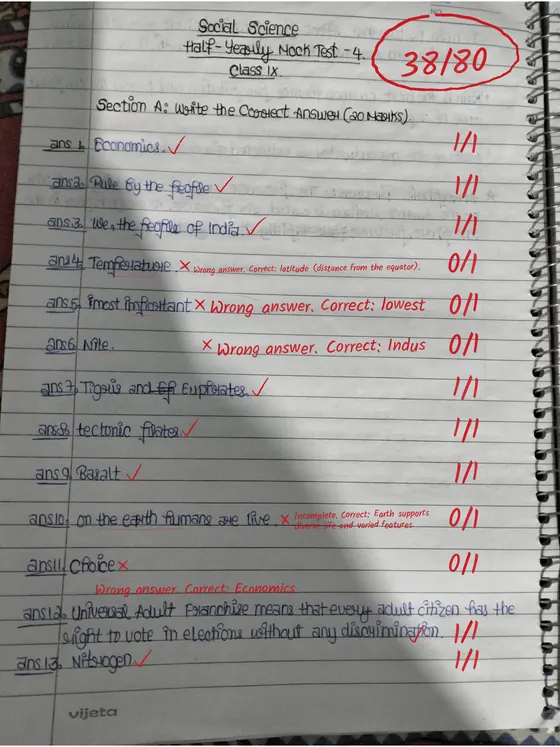 Real checked copyChecked · 38/80
Aditi Sharma
Roll 14
CheckedRohan Gupta
Roll 15
Download checked copiesCheckedSara Khan
Roll 16
Step 1 of 3
SST Half-Yearly Mock · IX-B
SST_half_yearly_IX.pdf
Read · 38 questions · 80 marks
Marking scheme ready
One per question, criteria add up to the marks
Use cases
Made for the moment the copies land on your desk.
Class teacher, after a unit test
Forty notebooks, one phone. Scan them in the staff room and send the batch before you leave school.
Coaching centre, after a weekend test
The coordinator scans every batch on Sunday. Faculty review marks on Monday and release results.
UPSC answer-writing programme
Mentors scan the day’s answer sheets; aspirants get their own copy back with notes on every answer.
Exam cell, sharing results
Download the zip of checked copies and share it with class teachers straight from the phone.
The same checking as the dashboard.
The app starts exactly the same check. What you get back does not depend on where the copies came from.
- Name and roll number read from page one; unsure copies wait for you
- One marking scheme per question, the same for every student
- Half marks with a written reason on every answer
- The student’s own copy checked in red pen, total circled
- An email when the batch is done
- Nothing reaches students until a teacher releases it
See a real checked copy or our case studies.
How it compares
| Evalezy app | Acadine app | A scanner app + checking by hand | |
|---|---|---|---|
| Made for | The teacher or exam cell checking copies | Students, teachers and admins of one institute (white-label) | Turning pages into PDFs |
| Scan copies with the camera | Yes, page by page, Next student between copies | Not described | Yes |
| AI checks the copies | Yes, every answer against one scheme per question | AI evaluation is in Acadine; doing it from the app is not described | No |
| Copy matched to the student | Name and roll number read from page one | Not described | No, you rename files |
| What comes back | The student’s own copy checked in red pen, as a zip | Notifications for grades, tests and announcements | The PDF you scanned |
| Teacher review before students see marks | Yes, in the Evalezy dashboard | Results publish automatically (teacher guide) | Not applicable |
| Price | ₹1 per page checked; failed copies free | Not published | Free or a subscription; checking is still by hand |
Acadine’s column is read from acadine.ai and docs.acadine.ai on 29 October 2026. Full, sourced comparison: Evalezy vs Acadine.
Frequently asked questions
When can I download it?+
The Evalezy app is launching soon, on Android first. Book a demo or message us on WhatsApp and we will tell you the day it is in the store.
Does it cost extra?+
No. The app uses your institute’s Evalezy account and credits: ₹1 per page checked in India, $0.01 elsewhere. Failed, stopped and unreadable copies are free.
Where do I create the test and release results?+
In the Evalezy dashboard. Set up the test and question paper there, and review, edit and release marks there. The app is for getting copies in and checked copies out.
What if a copy has no name on it?+
It waits for you. Pick the student from the list and the copy is checked; nothing is filed under a guessed name.
Can our institute control who uses it?+
Yes. An institute admin can switch the app off, or turn camera scanning and file upload on or off separately.
Is there an app for students?+
The Evalezy app is for teachers and exam cells. Students receive their checked copy by email when you release results.
See your own copies checked.
Book a 20-minute demo. Bring a question paper and a few scanned answer sheets, and watch Evalezy check them in red pen.